Guide to using the Herewith mobile app for senior care bookings
Find out how to download the Herewith app, plus learn the basics for convenient, on-demand senior care booking

How to find caregivers online with the Herewith mobile app
The Herewith mobile app is free and can be downloaded to your smartphone—either iPhone or Android—and includes all of the same convenient features for finding caregivers as you’ll find on our online portal.
Find and manage senior care bookings with the Herewith mobile app:
- Create your account or sign in using your preferred method
- Make Help Requests
- Chat with Helpers
- Keep track of confirmed bookings
- Get live shift updates when your Helper is on the job
- Review your Helper’s hours
- Manage your payment options
Benefits of the Herewith mobile app for easy senior care booking
The Herewith mobile app makes it easier to manage your Help Requests and Helper bookings wherever you are in your busy day, so you don’t have to worry about getting back to your computer to read Helper messages, track shifts, or manage payments.
The Herewith mobile app can be especially convenient for family members who book care on behalf of loved ones. Whether you’re local or long distance, you can keep tabs on your loved one’s care.
- Faster updates on important care info
Get instant push notifications for important info, such as new messages, payment alerts, live task or shift tracking, and booking updates. - Convenient access to your care search, chats, and payments
Manage your Help Requests and message Helpers from anywhere—no need to get back to your computer to keep up with your tasks and care. - Full transparency for Helper hours and payment
Review shifts and tasks in real time, so you never have to worry about getting charged for no-shows or wondering if your Helper has clocked in or out.
How to download the Herewith mobile app
For iPhones tap here, or:
- Go to the App Store on your iPhone
- Type Herewith in the search bar
- Tap Download
- Tap the Herewith app icon on your home screen to open the app
- Sign up or log in with your preferred method
- Go to the Google Play Store on your Android phone
- Type Herewith in the search bar
- Tap Download
- Tap the Herewith app icon on your home screen to open the app
- Sign up or log in with your preferred method
Guide to the Herewith mobile app: How it works
The Herewith mobile app has all the same features and capabilities as you’ll find when you log in to your Herewith account on the web.
Here’s a quick overview of how to use the Herewith mobile app and where you’ll find the tools you need for finding, booking, and managing your in-home care Helpers.
Top of the screen:
At the top of your screen, you’ll find everything you need to manage your account.
- This is the Menu where you can find Settings, Support, and Payment method
- Tap Settings to manage your account and access your account details, including information about you and your contact and notification preferences. Learn more about how to manage your Herewith account settings
- Tap Payment method to view and update your payment method. Learn more about how to manage your payments on the Herewith app.
- Tap Help Center to get in touch with Customer Support
Bottom of the screen:
This is where you’ll find everything you need to find, chat with, and book Helpers.
- Tap Browse when you want to view profiles of Helpers in your area. Learn how to interview Helpers on the Herewith app.
- Tap Helpers to view your current and past Help Requests or make a new Help Request. Tap on each Help Request to see more details, edit, cancel, or review applicants. You’ll see a red notification circle when you have new applicants ready to review. Learn more about creating your first in-home care Help Request.
- Tap Chats to view your messages to and from Helpers. You’ll see a red notification circle when you have new unread messages. Learn more about chatting with senior care Helpers on the Herewith app.
Still have questions? Learn more about in-home care services on Herewith.
Still need help?
Call our Support team for further assistance.
Mon-Sat, 9AM-6:30PM PT
Related Articles
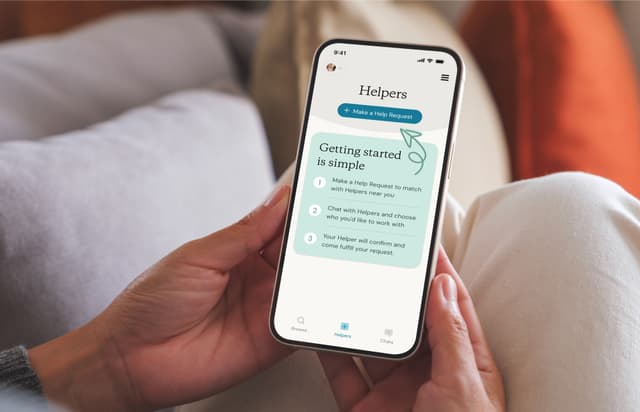
Learn about Help Requests for one-time or ongoing help, plus how to post a request, view applicants, edit, and cancel
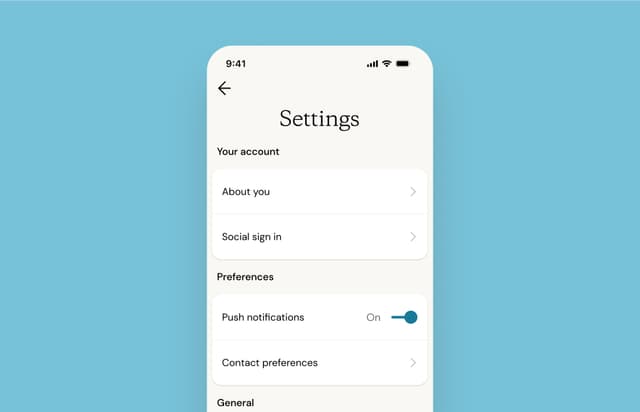
Learn how to change your notification settings, update your contact info, and manage your Herewith account preferences

Learn how to prepare for your first in-home care Helper on Herewith and what to expect on your first day of care


