What to Expect on Your First Day as an In-Home Care Helper
Here’s what to expect and how to prepare for your first booking with senior clients on Herewith

How to prepare for your first day as a caregiver
Now that you’ve been booked by your first senior care client on the Herewith platform, it’s time to get ready for your first day on the job. We’ve put together a quick checklist with everything you need to have a great first day of work and most importantly, to get paid.
Starting an in-home care job as a Herewith Helper
Step 1: Download the Helper mobile app
If you haven’t already, you’ll need to download the Helper mobile app. For iPhones tap here or For Androids tap here.
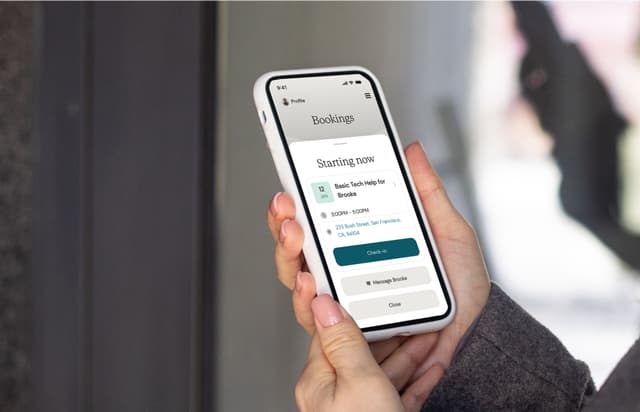
With the mobile app, you will clock in and out for tasks and shifts, track your pay, get live updates on bookings, search for jobs, and chat with clients on the go. We recommend taking a few minutes to explore the app before you arrive for your first shift, so everything feels familiar and easy.
Get help downloading the Herewith mobile app.
Step 2: How to prepare before your first day as a caregiver
- Download the Helper app on your mobile device
- Use the app to chat with your clients and make sure you have all the info you need for your task or shift
- Use the app to add a bank account where your pay will be deposited (learn how to set up your payment preferences)
Step 3: Caregiver onboarding: What to do on day one of your senior care job
- Arrive a couple minutes early so you can clock in on time
- Review our guide on clocking in and out using the Helper app
- Clock in using the Helper mobile app. We recommend that you enable your location settings to make it easier to clock in and out
- Plan to introduce yourself and get comfortable with your client and any family members that may be present
- Ask for a tour of the space where you’ll be working, noting where supplies are kept and if there’s any important info that your client may not have included their Help Request
Step 4: At the end of your task or shift
- Use the mobile app to clock out of your task or shift so you can get paid
- If the person who booked you is a family member of the care recipient, send a quick chat to them on the app, letting them know how the day went
- If you enjoyed working with the client, let them know they can rebook you!
Where to find the address for your first senior care booking
Before you apply, jobs and tasks show the city or town as well as an approximate distance to you, but not the specific address.
After you’ve confirmed a job or a one-time task, the booking details will be updated with the worksite address.
- Go to Bookings
- Ongoing job addresses: look under Ongoing Jobs and scroll horizontally to find the job you want to see. Tap on the card to see full details for that job
Task addresses: scroll to Upcoming Tasks. Tap on each task to see more details
More resources for getting started as an in-home Helper on Herewith
Still need help?
Call our Support team for further assistance.
Mon-Sat, 9AM-6:30PM PT
Related Articles

Here’s how to download the Helper mobile app for easy job-searching on the go

Everything you need to know about getting paid for tasks and jobs as a senior care Helper on Herewith
Your guide to logging your hours on the Helper app so that you can get paid for senior care jobs


